DNS (Domain Name Server)
cache (A temporary computer memory stored the recent visit pages and help you in quick processing of your request) is stored by Windows (XP and Vista). This cache helps is faster opening of websites already visited on the computer. However, At times this cache becomes corrupted and needs to be cleared.
Clear / Flush Cache Steps1. Click Start > Run
2. Type cmd and click OK.
3. In black window, type ipconfig /flushdns and press Enter key
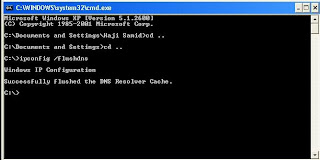
You will see the confirmation message as show above in the picture, There is a space between the ipconfig and flushdns.
I hope this will be informative for you !


